Showing posts with label softwares. Show all posts

Wednesday, June 22, 2011

Searching Wireless Network is easy

TechiOtaku tells you how easily you can search for wireless online networks for your WiFi or wireless MAC device..

Now you can search WiFi connections online. With wifi Stumbler now you can search wifi connections online. Search for open networks, specific manufacturers of access points, a particular SSID or MAC address or any other string in the scan results using this field.


If you want to see that WiFi There are close to you, you can expect WiFi Stumbler A simple Web application that uses technology Java WiFi scan signals.

WiFi Stumbler analyzes the access point name , frequency , channel, signal strength and the security used in this way we get a short report of the wireless networks around us.

This application is useful not only to work with good connection from the office or home , but when we left and we need connection, Being close to a park , airport , cafe , library , and many more places WiFi.

WiFi Stumbler specifies that we work with operating systems : Windows XP, Windows Vista, Windows 7, Mac OS X 10.5 ( Leopard) or higher. Also, web browsers connected to Internet, Firefox 3.5 , Firefox 3.6, Safari 4 Internet Explorer 7 Internet Explorer 8 and Google Chrome (Windows) .

Enjoy this super cool web application and do share and comment it..only on TechiOtaku.

Fetch.io :the cloud downloader

Over the past few years, we've seen a plethora of download servers and utilities that range from the infamous torrent clients to temporary file servers like RapidShare, Megaupload, and HotFile. Torrenting in particular has seen some new improvements in the area of clients; uTorrent (which was eventually acquired by BitTorrent) became one of the most portable, system-friendly clients and Webware sites like Torrific have even eliminated the use of client software altogether.

So how do you top that?

Fetch.io: A Swiss Army Knife download manager?
(Credit: Fetch.io)

Enter Fetch.io, a cloud-based service similar to the likes of Dropbox but with the utilitarian function of Torrific, as well as support for RapidShare, Megaupload, FileServe, and other services. Instead of downloading your files to your own computer, you input a torrent URL or any cyberlocker URL from a site like Megaupload, then go about your business. Fetch.io will "fetch" the files itself using its own connection, download them to a remote server, and notify you of the completed ingestion via e-mail. You can then access your files directly from your Fetch.io folder in a process similar to Dropbox.

If you download a movie file, Fetch.io will automatically encode it as MP4 or Flash format for streaming support. This opens up movie-streaming potential for various media platforms and mobile devices.

Keep in mind that although Fetch.io's servers can download files at an amazing rate, users are still capped at their own respective download speeds and bandwidth when accessing their completed downloads on Fetch.io's servers.

Fetch.io is currently in the beta stage and is offering user accounts of up to 20GB of free storage and 40GB in bandwidth. Fetch 'em while they last.

Get it from here

share it..


Wednesday, June 15, 2011

Burn-Studio Audio Tool


Those who get bored mixing on virtual DJ or Tracktor,which i m sure would not get bored because they are so exclusive,to all others let us introduce the chrome app Burn-Studio Tool. it is a chrome browser app which allow users to mix music for free and upload them and share them.


The uberness of the app is its user interface which will blow your mind.
It is easy to use and doesnt takes a lot of time rendering the music,you can choose from a variety of music samplers and instruments to play along.Those acknowledged with Console DJs will find it very entertaining.
So install this app and enjoy..mixing music.

Click here to install this app and start mixing...

http://burn-studios.audiotool.com/app


For more help..see this video..


Thanks for your patience and reading this post..share it ..

Monday, May 09, 2011

REAL SPEED

REALSPEED is a program empowering and speed up your internet connection sharply. It is optimizing the unknown settings and the registry of your operating system. Supports most of the connection types like Modem, Cable, ISDN, xDSL, Satellite, etc. and also most of the programs like NeoPlanet, Opera, AOL, PcAnyWhere, etc. This program enables you to send and receive bigger information packets for your protocol safely and by means of a Stay-Alive Tool attached to this program, your connection will never drop in any case. Update Tool lets your product keeps up to date with downloading patches and new optimization types.


Sunday, May 08, 2011

Software Informer

Software Informer is a programme, whose primary aim is to give you the up-to-date information about the software you actually use. Whenever a more recent version of any programme becomes available, Software Informer notifies you and offers a link for downloading the update. It also allows you to keep track of comments and questions on corresponding software.

CS 1.6 NON-STEAM || NO SURVEYS ,TOTALLY FREE ||

Tired of trying to find an actual/working Counter Strike 1.6 Hack even after months of tireless searching on the internet??


Search NO more !!

TechiOtaku is here, yet again to help you out.

The featured HACK PACKAGE includes ::

1.BaDBoy v5 (works for both STEAM and NON-STEAM , undetected by automated servers )

2.C.C.A._Hook_version 2.o for private (works flawlessly on NON-STEAM servers)


both the software packages and sXe injects include 

-Aimbot
-Speed
-Auto Wall
-Crosshair
-No Spread
-No Recoil
-Knife Speed
-Much more

download xanaduiN badboy hack.rar file from here or click the link below


1.1 To start the BADBOY cheat do this:


1) Open BaDBoYv5.exe
2) Press Load Hack button
3) Start Counter Strike and join a server
4) Press "end"-button to start cheat
5) Press "insert"-button to set up the cheat.
If you don't know how to move in the menu that comes up you scroll with your mouse-scroll to get down and up in the menu. To get in to a sub-menu, you press the left mouse button, and if you want to go back one step you press the right mouse button. As simple as that.
 6) Press start-it in the menu to activate the hack


2.1 For the C.C.A. hack do this

1. After the download extract RAR file open C.C.A HooK v2. 0 for PrivateC.C.A HooK 2.0 home folder.
2. There you will see CCA hack.exe open it asks your CS 1.6 path setting.
3. Set your path c: file counter strike 1.6hl.exe or what is always yours.
Your counter strike 1.6 game to start and press L connect new game on your system.when is the game with any server or start then your CS 1.6 hack began is started.


New feautures added in version 5.
- New AimBot that aims better.
- New consol with a picture as background.
- New menu-style
- New ESP textures
- Winamp player
- Panic Key (not working properly)
- A clock below the radar

To get the cheat-console up you press "delete"-button.
In here you can write many commands like:
- speed
- wall
- nospread
- avdraw
- and many more
With the commands you might have to add a number after witch will set the setting for you. You could change the wall for an example by writing: wall 2


Tuesday, May 03, 2011

Free Utility To Make Your USB Pen Drive Bootable

Hello techiotakus this post is for those avid windows users who are in a hurry and would like to boot up from USB..
If you are an fairly advanced computer user, at times you may need to boot from devices other then the default hard-disk, mainly to troubleshoot virus infections and other critical operating-system related issues, I had shared tips on how to make bootable cd for performing advance system tasks on windows. Today I will share few utilities enabling you to create bootable USB pen drives with ease, you need to have Motherboard/BIOS with USB boot support for this to work.
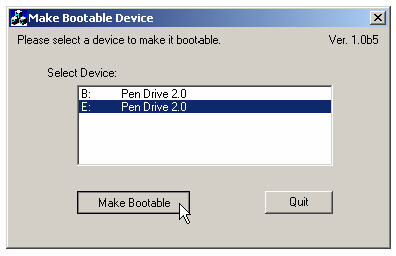
MakeBootable


MakeBootable is an free and simple-to-use utility to make your Pen Drive act as a boot-up disk without erasing any data on the device. It consists of a single executable file and requires no installation, However the utility will only work on USB device's using Phison’s chip solution and FAT file-system only (you can re-format your drives to FAT easily).
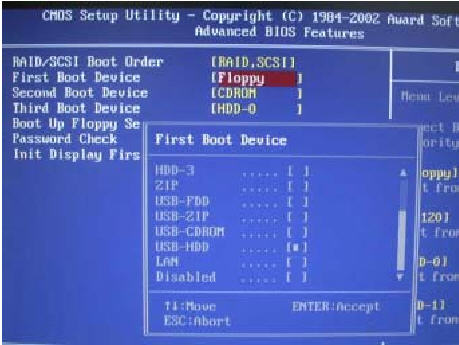
There are quite a few other manual methods to make usb devices bootable as discussed here, once you succeed in making your USB drive bootable using any of the method discussed above, You need to change the boot-up setting in the system BIOS as described below to boot using your portable device:

With your device inserted, restart the machine.
Enter the BIOS setup menu to change the boot device setting.
If the boot-up files are created in the USB drive, select USB-HDD or USB-ZIP (preferred). If the boot-up files are created in the floppy drive of your device, select USB-FDD (for Pen Drive that supports security mode).
Save and exit the BIOS setup. You should be able to boot up with you USB device...

click on the button to start downloading this utility..or click on the link below..


Or  click here ->                               Download This


Hope it makes you problem go way..do comments if you have any problem and share it...


Sunday, May 01, 2011

Calibre: e-book management


Calibre is free and open source e-book computer software that organizes, saves and manages e-books, supporting a variety of formats.[1] It also supports e-book syncing with a variety of popular e-book readers. Calibre is cross-platform (programmed in Python and C) and is intended for the three main operating systems, Linux, Mac OS X and Windows. Calibre was originally called libprs500, but was renamed in mid-2008.
  • Original author(s)    - Kovid Goyal
  • Developer(s)    - Calibre Team
  • Initial release   -  October 31, 2006; 4 years ago (2006-10-31)
  • Stable release    - 0.7.58  (April 29, 2011; 1 day ago (2011-04-29)) [+/−]
  • Development status     -Active
  • Written in  -   Python, C
  • Operating system   -  Linux, Mac OS X, Windows
  • Platform   -  Intel x86 - 32-bit, x64
  • Available in   -  37 languages (fully or partially translated)
  • Type  -   E-book management utility (utility software)
  • License   -  GNU GPL
  • Website    - calibre-ebook.com

Features

Library management

Calibre is primarily an e-book cataloging program. It is designed around the concept of the logical book, where a single database entry corresponds with the same book in a variety of formats. Calibre supports the following formats for cataloging: AZW, AZW1, CBR, CBZ, CHM, EPUB, FB2, HTML, IMP, LIT, LRF, LRX, MOBI, ODT, OEBZIP, OPF, PDB, PDF, PML, PMLZ, PRC, RAR, RB, RTF, SNB, TPZ, TXT and ZIP.

Calibre supports sorting the books in its database by:
  •     Title
  •     Author
  •     Date
  •     Publisher
  •     Rating
  •     Size (Max size of all formats)
  •     Series


    It also supports extra metadata fields that can be searched on:
    •     Comments: A general purpose field that can be used to describe the book.
    •    Tags: A flexible system to categorise books.
    Calibre also supports metadata retrieval via the Internet for a book based on its ISBN number or its title/author, instead of manually entering the metadata.
     Format conversion
    • Calibre supports the conversion of many input formats to many output formats. It can convert any of the following input formats to any of the output formats.
    • Input Formats: CBZ, CBR, CBC, CHM, EPUB, FB2, HTML, LIT, LRF, MOBI, ODT, PDB, PDF, PML, PRC^, RB, RTF, TCR, TXT
    • Output Formats: EPUB, FB2, LIT, LRF, MOBI, OEB, PDB, PDF, PML, RB, RTF, TCR, TXT.

    (^PRC is a generic format, calibre supports PRC files with TextRead and MOBIBook headers)[4]

    Format conversion includes support for advanced typesetting features such as tables, dropcaps, inline[disambiguation needed] images, and embedded fonts.
    Calibre supports e-book syncing with the iPhone using Lexcycle Stanza.


     Syncing

    Calibre currently supports the Sony PRS 300/500/505/600/650/700/900, Cybook Gen 3, BeBook (mini), Amazon Kindle (1, 2 (international and DX), and 3), Kobo, iPhone (with iBooks (via iTunes or ePub download) or Lexcycle Stanza reader software), Palm Pre, Entourage Edge, Longshine Shinebook, Ectaco Jetbook, Irex Illiad/DR1000, Foxit eSlick, PocketBook 360, Itallica, eClicto, Iriver Story, Airis dBook, Teclast K3, SpringDesign Alex, Hanvon N515, Binatone Readme, and Android phones (with the WordPlayer reader software) and both Windows Mobile and Windows Phone 7 phones using the Freda reader software. Also, Calibre can export any ebook, allowing it to be synced to any device that can be mounted via USB.[5] Version 0.6.27 (December 11, 2009) added support for the Barnes & Noble Nook.[6] If a book has more than one format available, Calibre automatically chooses the best format when uploading to the device.

    News retrieval

    Calibre can be configured to automatically fetch news from a number of websites/RSS feeds, format the news into a e-book and upload the e-book to a connected device. At the moment there is support for generating LRF/EPUB e-books. The e-books include the full versions of the articles, not just the summaries. Supported news sites include Newsweek, New York Times, the BBC, The Economist, The Wall Street Journal, and ESPN.

     E-book viewer
    Calibre comes packaged with an all encompassing e-book reader, which can read any of the aforementioned formats in the format conversion category.

    Content server
    Calibre also supports a built-in web server that allows users to access their e-book collection using an Internet browser and an Internet connection. The web server also allows the user to e-mail books and download news automatically.


    Digsby = IM + Email + Social Networks


    Digsby is a freeware proprietary multiprotocol instant messaging application developed by dotSyntax, LLC. Digsby is written in Python and uses wxPython as its widget toolkit and WebKit for rendering. It supports most mainstream IM services such as AOL Instant Messenger, Microsoft's .NET Messenger Service, Yahoo! Messenger, ICQ, Facebook Chat, MySpace IM and XMPP/Jabber-based services such as Google Talk and LiveJournal's IM. Secondly, Digsby supports e-mail notifications via POP, IMAP and webmail like AOL, Yahoo! and Hotmail - including the ability to mark messages as read, as spam or delete them from the client itself. Finally, Digsby also supports alerts and newsfeeds from MySpace, Facebook, Twitter and LinkedIn.
    • Build 88 - r29967 (Public Beta) on Windows XP
    • Original author(s)   -  Steve Shapiro
    • Developer(s)    - dotSyntax, LLC.
    • Initial release -    Build 1 (alpha), December 22, 2007
    • Stable release -    Build 90 - r30044 (Public Beta) / April 12, 2011; 18 days ago (2011-04-12)
    • Development status   -  Active
    • Operating system   -  Microsoft Windows (Mac os & Linux Versions are under development)
    • Size  -   20 MB
    • Available in   -  English
    • Type     Instant messaging client
    • License   -  Proprietary
    • Website   -  www.digsby.com


    Features

    Supported IM protocols

    •      Microsoft Notification Protocol (.NET Messenger Service/Windows Live Messenger, commonly known as MSN)
    •      OSCAR (AIM/ICQ/MobileMe)
    •     XMPP/Jabber (Google Talk, Facebook Chat, Live Journal's IM, et al.)
    •    Yahoo! Messenger Protocol
    •     MySpace IM

    Buddy list

    It is possible to customize the buddy list by re-arranging of all aspects of it and skinning it for a personalized look. Users can set custom notifications for various actions such as contacts signing in and out, messages sent and received, etc. It supports meta-contacts, which is a drag-and-drop system that allows a user to have one alias for a contact who uses multiple IM protocols with different accounts. Buddy list, IM accounts, widgets, and application settings are synchronized on Digsby's server, so all user settings can be transferred between installations on other computers


    Supported Email

    The program includes a rudimentary email client, with e-mail notifications. It automatically retrieves a "from" email address from the logged in instant messaging profiles.
    •      Gmail
    •      Yahoo! Mail
    •      Hotmail
    •      AOL Mail
    •      POP/IMAP email


    Supported Social networks

    Digsby allows users to add social networking sites to the application:
    •      MySpace: Shows updates to a user's friends' profiles, status, and private messages, and instant access to various parts of their MySpace account, such as their profile, home page, blog, etc.
    •     Facebook: Shows updates in a user's friend feeds.
    •      Twitter: Allows users to easily submit new "tweets", and view their friends' tweets.
    •      LinkedIn: Shows various updates from a user's friends.


    Limitations

    A common feature in equivalent multi-protocol IM clients is missing, which is IRC support.


    DOWNLOAD DIGSBY
    Share it..and tell your friends about this cool software...want to know more about latest tech ? clcik here .

    Saturday, April 30, 2011

    Key's Redefined


    Hello techiOtakus, here we bring you another post... this post is about remapping your keys on the keyboard...


    The other day i found some of my keys were not working.... so i searched the internet as my friend told there is a software that can change the key and i found KeyTweak.


    KeyTweak lets you remap any key on your computer’s keyboard. KeyTweak makes modifications into your registry to remap your keys where you want them. It doesn’t launch specific programs with specific. It’s just re-map keys. for example you want type K when type P. so you remap P to Type K. Also able to re-map special keys F1-F12 .. Useful tool for Laptop Users.


    Other very useful app is on-screen keyboard... it is a windows app and comes preloaded with windows..


    Leave comment if you have any question about it usage..and share it.


    Saturday Firefox Extension II


    Hello guys we are back again with another Firefox add-on this week.in this series we tell you about one Firefox extension which makes your browsing experience better.
    Read till end what we have got today for you and download this extension and install it..


    Customize Google


    Customize Google is a very robust extension that lets you customize many features of the services provided by Google. Customize Google lets you block advertisements on pretty much any Google page (including Gmail). It remaps Google Images search results to point directly at the images (no longer will you need to click through the originating site).


    Customize Google lets you add links from other search engines directly into your search results. It can also block Google click tracking and allows you to connect to Google Calendar and Gmail securely (https). Give it a try, you won’t be sorry.
    Click on anyone to watch a short introduction..


    Hope you liked the introduction part..pour in comments to know more and suggest your favorite extensions.

                                      Click To Download 


    Share it...as no world is better without sharing.

    Friday, April 29, 2011

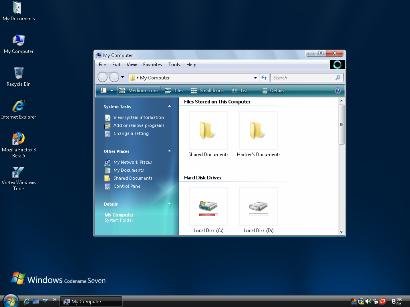
    UX Theme Patcher -Turn Your XP into Mac

    If you have been fiddling through to change the old boring look of your windows XP then you are at the right place..just read till end to find out how you can change your window Xp theme with no headache and without turning your PC to tortoise .

    UXTheme Patcher 


    Since Windows XP was released, there are countless 3rd-party visual styles released by many skinners in order to improve user's experiences and eye candy. To use non-certified visual style is disallowed by Microsoft's certificate protection so you need to bypass certification verification in uxtheme.dll.

    This program will patch your theme engine files so you can use any 3rd party visual style on the following operating systems (non-beta releases only):
    · Windows XP x86 Editions (up to Service Pack 3)
    · Windows XP x64 Editions (up to Service Pack 2)
    · Windows Server 2003 x86 and x64 Editions (up to Service Pack 2)
    · Windows Vista x86 and x64 Editions (up to Service Pack 2)
    · Windows Server 2008 x86 and x64 Editions (up to Service Pack 2)
    · Windows 7 x86 and x64 Editions


    However, please remember that you are advised to create a restore point before using this patch in order to make sure you don't lose any data or settings.


    Download the Mac OS theme From Here only by TechiOtaku.


    Visit This site for more Windows themes....


    Watch this video for more details..


    Download this and share it with others.


    Take a look at the Naruto Wallpaper Collections in order to make your system look more better.

    Music Mania : Ableton Live

    Heya Techis and Otakus,we bring another post for the series on music mania for all the music loving buddies out there. So what we have got in today’s post is the super awesome software used by most of the music mixer,producers sound recordist and yeah The DJs. Hold your breath and read the ;ost till the end..oh you dont have to hold your breath just read.


    Ableton Live


    Ableton Live is tailored for simple, on-the-fly audio production, but provides classic audio workstation functions found in more expensive software. The Arrangement View shows a familiar timeline-based interface found in other digital audio workstations, while the Session View is perfect for improvising and sketching out all your musical ideations.


    In either view, adding sound clips, full tracks and virtual instruments from Live's extensive audio Library is a simple task with the File Browser. Drag and drop audio files from the library, or anywhere on your computer, into the timeline. Once you have your composition together, changing the speed is a simple matter of using the warp tool to alter speed without warbling, stuttering, or other artifacts.
    As it makes clear in its namesake, Ableton Live is built for live performance. The program and its interface are designed for on-the-go, real-time manipulation, modification, mixing and creation. For that reason, electronica artists the world over have been using the program successfully in their sets as a central instrument, using its sequencers, synthesizers, effects and combinators to make sounds and songs unlike any other.


    While much of the performance is dependent on the computer specs, meeting and exceeding the recommended specifications will almost assure users of seamless, latency-free performance.
    Ableton Live is used by artists the world over, for everything from quick digital notepad sketches to full, end to end audio production. With the added features and clean interface, you'll spend more time creating and experimenting in Ableton Live, and less time setting up and troubleshooting.


    Ableton Live can also be used to mix songs before live performance,it provides unique features which can be used by amateur also .It is easy to learn and easier to mix.


    Thanks to its unique real-time features, Live opens up entirely new worlds of creative expression. Mix any number of tracks and loops, remix on the fly , capture audio loops in real time from decks and other external sources, incorporate your own productions into the mix, and much more. Whether it's the center of your DJing rig or a creative addition to your existing setup, Live brings fresh possibilities to DJing.

    Record perfectly cut loops on the fly, mix and match audio of any tempo, and add effects, all without ever stopping the music: Everything happens in real time. Follow your inspiration and use your time more creatively, instead of spending it converting sample rates, calculating tempos, editing loops and routing complicated effect chains. Live keeps the music flowing and gives you back your creative time.


    Live is a musical sketch pad that quickly and easily lets you try out new ideas and capture those you like for later use. From Live Clips to Racks and its powerful browsing capabilities, Live encourages experimentation and makes sure that no good idea ever gets away.


    Download it from here,give it a try and feel free to ask anything about it..


    Thursday, April 28, 2011

    Music Mania : Traktor Pro

    Hello TechiOtakus…well this post is the continuum of the music mania series in which we tell you how to mix songs and all posts related to music and mixing. So in this post we will tell you about another song mixing softwares used by professional DJs to mix awesome tracks on their computer.


    Traktor Pro


    For everyone from the professional DJ to the music enthusiast, the abundance of great DJ software is out there waiting for you. The best we have found is TRAKTOR Duo 1.2. With its expansive special effects and features, easy-to-use interface, and complete compatibility with external equipment, TRAKTOR Duo stands head and shoulders above the competition.


    TRAKTOR Duo 1.2 provides for the ultimate experience in DJ software making it our number one choice. Boasting a variety of fully modular and customizable interface settings, an impressive set of mastering and recording tools and some of the most accurate and easy-to-use loop and beat-matching tools available, TRAKTOR Duo makes a very convincing argument for itself. Best of all, it’s fully compatible with iTunes and most file formats, even allowing for the direct import of files from an iPod or other personal audio or data storage device.


    Design Features: 


    TRAKTOR Duo stands out for its ability to integrate advanced effects and options into a simple, user-friendly format. Much of the estimation and guesswork that goes into properly mixing tracks is eased with measured beat points displayed continuously in a dynamic beat visualizer. Loops and effects are synchronized to execute in coordination with timing of the track at play.


    Providing for a simple and comprehensive importing and exporting, this DJ software easily uses and converts files of various formats, while sidestepping many of the time-consuming paths that most of its competition requires for reformatting and importing. Best of all, TRAKTOR is fully compatible and easily-integrated with iTunes and other personal audio devices. It even offers full integration with BEATPORT.com, where new tracks can be purchased and downloaded directly to TRAKTOR Duo.


    With full support for multiple MIDI controllers, HIDs and advanced MIDI assignments for optional line-in control by CD, vinyl or MP3 decks and its capability to record mixed CD’s, broadcast directly to the internet, iPod, and an external MIDI keyboard, again, this program proves its right to be in first place.
    TRAKTOR Duo also features automatic gain control, high quality, independent tempo and key correction, providing for seamless mixes between tracks that would otherwise require a great deal of manual adjusting. The loops and effects are automatically synchronized with the track at play to provide the ultimate performance. Its Elastique time-stretch feature has the ability to carry on with a high workload, displaying the quality of this product.


    The interface is incredibly easy to use. With large easy-to-find buttons and real-time reactions, this site impressed us with its ease of use and smooth transitions. This program also boasts of awesome effects that assist the user in mixing and creating amazing electronic music. If you want to share your mixes with your fellow DJs, future employers, or just put your name out in the wide world of techno media, recording and publishing is painless with many options, including CD burning, iPod recording and internet broadcasting.


                                                                         Download This


    Take a look at the Video Pick to get it more clear what Traktor Pro can Achieve


    What..? Didn't get it ? Now take a look at the pro Djs mixing with Traktor Live.


    Mix music like never before and please comment along with your playlist…dont forget to share it with friends and family.

    Tuesday, April 26, 2011

    Music Mania : Virtual DJ 7 Pro

    TechiOtaku is starting this series of music mania which will help any buddy out there who wants to be a DJ or music mixer. Even newbies and amateur can give it a try on hand mixing music with the super cool software provided by us. This series is dedicated to music lovers and amateur DJs ,worry not friends we will make you  pro..just follow the series.
    In the course of music mixing the first step is to have a good collection of music,songs and samples. So,before trying anything make sure you make  a playlist in which you can put your heart’s content..and then give this software a try.

    Virtual DJ 7 Pro

    Virtual DJ is often packaged with USB-based hardware mixing consoles from the likes of Hercules and Numark, and, in fact, if you really want to delve into the full array of features, such devices are going to be a necessity--and they'll require a $99 license fee to upgrade to the Pro version of the software. That said, you can download the app for free by itself and make very basic mixes and playlists.
    While the program isn't specifically geared at newbies, it is intuitive enough for a musically inclined individual to use right off the bat. Once installed, Virtual DJ automatically populates a folder tree in the bottom left corner where you can easily access your music collection. The bottom middle serves as a tabbed, multifunction area where you can browse tracks, sample music bites, add effects, and make recordings.


    Virtual DJ


    The top of the window is dominated by two digital turntables, which are distinguished by color: blue on the left and red on the right. Each one has the ability to cue, loop, adjust pitch, scratch, and shift (among other features). In the middle is the mixing console, where you can adjust the gain and master volume, as well as transition between the two tracks. Once the songs have been dragged and dropped into the console, a bar along the top displays the sound waves of each to help with visual mixing. There's also a video input option that lets you create montages to the music.
    It is stable, easy to use, insanely configurable, powerful and because of all of this, wildly popular. It is more immediate than Traktor for the beginner, it will work on just about any hardware, it has busy and helpful user forums, and has been consistently ahead of the pack in many areas, not least video mixing.


    virtualdj


    It also has built-in key detection, something none of the others has managed yet and arguably a must-have DJ tool nowadays.
    The stylish interface and high number of features score points, but learning how to use the program is a hit-or-miss proposition. To be perfectly honest, using it without mixing hardware (that is, just a mouse and keyboard) is a challenge, and not one we enjoyed, so we recommend hooking up a compatible USB controller. Also worth a look: the thorough online user guide.
    Virtual DJ is free, fully featured, and well-laid-out. It's a useful option both for aspiring mixers and newbies.


    First download it from Here


    Now we will teach You how to mix some songs and play them in front of friends or may be live Djing…

    Virtual DJ – TechiOtaku DJing Tutorial


    So,Virtual DJ is just aperfect tool for learning DJing for first time. Thus to start with you must download Virtual DJ first .

    Step 1:


    Create a playlist first,open virtual dj and point the folder option to the location of your songs. Drag Some songs,here we are going to mix five songs,So let us choose theme songs,you can create your own genre.
    we will only mix Bollywood songs,as they are easier to mix for amateurs First we will choose Twist From the movie Love aajkal because it has a good tempo and cool beats,then we will add broken angel track mixed by mazzr,proceeding with peeloon (mash Up DJ remix ) and to add a hip hop track we will add char baj gaye hai(Mash Up Mix) the latest track,and at last we will play Tere Liye (Mixed by DJ ASen) with some filler as Atrium (River Flows in you Edit). You can eventually expand and produce awesome mixes.
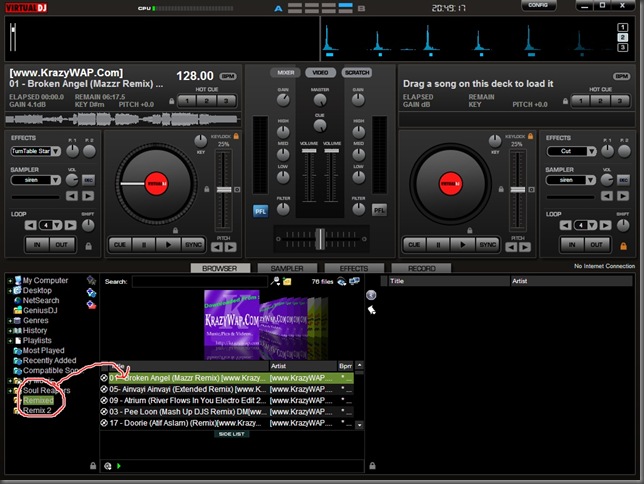


    Adding Songs


    Step 2 :


    Then we will start with broken angel track and drag it to left deck,and add peeloon mix on the right deck,We will then click the play button on the left track also at the same time we will put the flanger effect ,which can be found in the effect tab,this will spice up the songs.You can also add various other effects,give it a try.
    Playing one track


    Step 3 :

    Now after some time here at 2:30 minutes we will start peeloon track,now here Techiotaku is going to teach you how to beat matching,a trick which is basic for all DJ learners.
    In beat matching while one song is playing other song is also played at the same time by adjusting the pitch ,Volume gain or tempo in such a way that it syncs with the other song. So here you can do that by looking at the BPM analyser at top and beat pattern,just start the next song when both the beats match each other.In virtual DJ Beat matching is very simple, Just press the sync button shown by red round below,while playing Peeloon track.
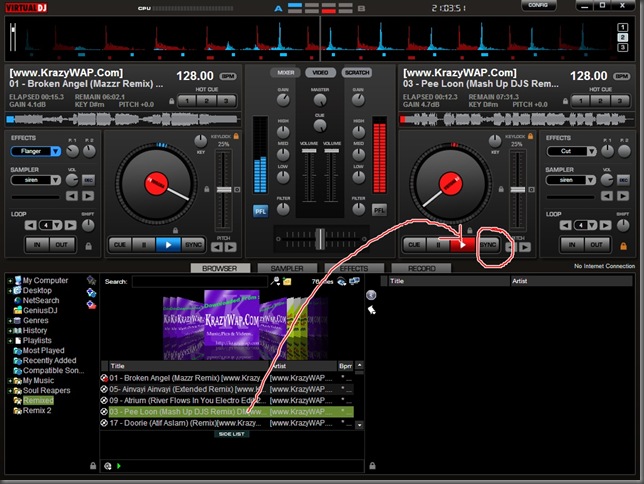


    Beat Matching


    Final Step :

    Similarly play all the tracks one by one,while adjusting the gain and cross fader controls. You can also add samplers from each track,samplers are small part recording of a track,for example sample of a drum beat or siren.Remember to become a good DJ you need to practice a lot,and dont play tracks for more than 3 –4 minutes else the audience will get bored. Try adding a beat song after hip hoip and play love songs after trance or pop.


    Finished Mixing  


    Here is the video Pick to which will clear you more.


    Hope it helped you to learn some DJing and please comment if you want to add more or have any suggestions regarding this,Do not forget to share it.

    Monday, April 25, 2011

    Tune Up Utilities Vs AVG Utilities

    Hello TechiOtaku readers, we have been fiddling through some of the best softwares for our software section.
    So in this post we would like to tell you about the two super cool utility softwares available for cleaning your PC. Windows is amiable platform but it also requires clean up regularly. So let us see what they provide :

    Tune Up Utilities 2011


    To call TuneUp Utilities 2009 useful would drastically understate the situation. The app provides users with a powerful,well-designed utility that accesses the entire Windows maintenance tool set and more in a fast, organized, and easy-to-use series of connected modules.Temp file management, registry cleaners and start-up program controls are the bread-and-butter of these utilities, and these basics work in TuneUp more quickly and easily than most.However, the app also sports great add-on tools you don't usually see in a utility program. It offers a variety of Internet and program-acceleration tweaks as well as Windows performance enhancers.The crash-preventing MemOptimizer, a file shredder,deleted file recovery, and a respectable uninstall utility round out the suite. You even can automate maintenance tasks with the scheduler or tweak Windows' appearance with the styler tool. The built-in RescueCenter can restore all changes completely or one by one.


    The system-analyzing wizard,with its thorough reporting and upgrade suggestions, is worth the program price alone.Between the guts of steel and the stylish, logically arranged interface, TuneUp Utilities suits all users--from complete beginners who will appreciate the one-click optimization to more daring users who will experiment with all the settings.

    Download it for free from here

    AVG PC TUNEUP 2011

    AVG PC TUNEUP 2011 is a tool created by AVG to fix computer problems that may slow down the performance of your PC. AVG PC TUNEUP is a software to-go-to to help you get the most out of your computer. It can be used to fix issues that affect your systems performance and have a faster running and worry-free computer without reinstalling Windows.


    • Optimize Internet by tuning the connection and speed-up online activities.
    • AVG PC TuneUp comes with a file recovery function to retrieve accidentally deleted files.
    • Wipe sensitive files and folders just like a file shredder
    • Protect your privacy and sensitive files online and offline
    • Helps to clean up old and duplicated files
    • Disk defragmenter will help improve your hard disk speed
    • Comprehensive tools to monitor hard disk health and space
    Download it from here
    Well that brings to the end of clash,hope it helped you to figure out which one is better.TechiOtaku recommends Tune Up utilities,Download it give it a try and do not forget to share it with your friends.