Showing posts with label Technology. Show all posts

Wednesday, June 22, 2011

Searching Wireless Network is easy

TechiOtaku tells you how easily you can search for wireless online networks for your WiFi or wireless MAC device..

Now you can search WiFi connections online. With wifi Stumbler now you can search wifi connections online. Search for open networks, specific manufacturers of access points, a particular SSID or MAC address or any other string in the scan results using this field.


If you want to see that WiFi There are close to you, you can expect WiFi Stumbler A simple Web application that uses technology Java WiFi scan signals.

WiFi Stumbler analyzes the access point name , frequency , channel, signal strength and the security used in this way we get a short report of the wireless networks around us.

This application is useful not only to work with good connection from the office or home , but when we left and we need connection, Being close to a park , airport , cafe , library , and many more places WiFi.

WiFi Stumbler specifies that we work with operating systems : Windows XP, Windows Vista, Windows 7, Mac OS X 10.5 ( Leopard) or higher. Also, web browsers connected to Internet, Firefox 3.5 , Firefox 3.6, Safari 4 Internet Explorer 7 Internet Explorer 8 and Google Chrome (Windows) .

Enjoy this super cool web application and do share and comment it..only on TechiOtaku.

Mozilla seabird :know what it is

Mozilla Seabird is what would be the phone of the future. As there would be more and more features in the phone, and it will also use the spaces around to make it more productive.


The mobile phone Seabird takes the objects around us, to project touch devices in air . Billy May is the one who designed this mobile phone. The external design is similar to any other Phone market , however , his concept of projection(dual projection on different side) and using it, is interesting.

We can project these images on a wall, like a screen on the opposite side as a keyboard on our table or desk , and a mouse or mouse, based on a Bluetooth.

Personally , I think it is entirely possible , in 5 or 7 years , I see this cell or mobile phone is so futuristic or rather unrealistic.

Video of Mozilla seabird


share it to tell your friends about it..

Fetch.io :the cloud downloader

Over the past few years, we've seen a plethora of download servers and utilities that range from the infamous torrent clients to temporary file servers like RapidShare, Megaupload, and HotFile. Torrenting in particular has seen some new improvements in the area of clients; uTorrent (which was eventually acquired by BitTorrent) became one of the most portable, system-friendly clients and Webware sites like Torrific have even eliminated the use of client software altogether.

So how do you top that?

Fetch.io: A Swiss Army Knife download manager?
(Credit: Fetch.io)

Enter Fetch.io, a cloud-based service similar to the likes of Dropbox but with the utilitarian function of Torrific, as well as support for RapidShare, Megaupload, FileServe, and other services. Instead of downloading your files to your own computer, you input a torrent URL or any cyberlocker URL from a site like Megaupload, then go about your business. Fetch.io will "fetch" the files itself using its own connection, download them to a remote server, and notify you of the completed ingestion via e-mail. You can then access your files directly from your Fetch.io folder in a process similar to Dropbox.

If you download a movie file, Fetch.io will automatically encode it as MP4 or Flash format for streaming support. This opens up movie-streaming potential for various media platforms and mobile devices.

Keep in mind that although Fetch.io's servers can download files at an amazing rate, users are still capped at their own respective download speeds and bandwidth when accessing their completed downloads on Fetch.io's servers.

Fetch.io is currently in the beta stage and is offering user accounts of up to 20GB of free storage and 40GB in bandwidth. Fetch 'em while they last.

Get it from here

share it..


Wednesday, June 15, 2011

Burn-Studio Audio Tool


Those who get bored mixing on virtual DJ or Tracktor,which i m sure would not get bored because they are so exclusive,to all others let us introduce the chrome app Burn-Studio Tool. it is a chrome browser app which allow users to mix music for free and upload them and share them.


The uberness of the app is its user interface which will blow your mind.
It is easy to use and doesnt takes a lot of time rendering the music,you can choose from a variety of music samplers and instruments to play along.Those acknowledged with Console DJs will find it very entertaining.
So install this app and enjoy..mixing music.

Click here to install this app and start mixing...

http://burn-studios.audiotool.com/app


For more help..see this video..


Thanks for your patience and reading this post..share it ..

Tuesday, June 07, 2011

iOS 5-Techiotaku unveils all the details


Hello,techitakus and tech geeks. we are privileged to raise the curtains from the details of the most awaiting iOS 5. 


Apple has sold so far 200 million iOS devices and this was the latest update to this huge platform. lets see the press release directly from WWDC event .


New Version of iOS Includes Notification Center, iMessage, Newsstand, Twitter Integration Among 200 New Features Available to iPhone, iPad & iPod touch Users This Fall

SAN FRANCISCO―June 6, 2011―Apple® today previewed iOS 5, the latest version of the world's most advanced mobile operating system, and released a beta version to iOS Developer Program members. The iOS 5 beta release includes over 200 new features that will be available to iPhone®, iPad® and iPod touch® users this fall. New iOS 5 features include: Notification Center, an innovative way to easily view and manage notifications in one place without interruption; iMessage, a new messaging service that lets you easily send text messages, photos and videos between all iOS devices; and Newsstand, a new way to purchase and organize your newspaper and magazine subscriptions. With the new PC Free feature, iOS 5 users can activate and set up their iOS device right out of the box and get software updates over the air with no computer required.

"iOS 5 has some great new features, such as Notification Center, iMessage and Newsstand and we can't wait to see what our developers do with its 1,500 new APIs," said Steve Jobs, Apple's CEO. "Perhaps iOS 5's paramount feature is that it's built to seamlessly work with iCloud in the Post PC revolution that Apple is leading."

With iOS 5 and iCloud®, you just enter your Apple ID and password and iCloud will seamlessly integrate with your apps to automatically and wirelessly keep all of your mail, contacts, calendars, photos, apps, books, music and more, up-to-date across all your devices without ever having to connect to a computer.

Notification Center provides iOS 5 users with an innovative way to easily access all notifications―text messages, missed calls, calendar alerts, app alerts and more, all in one place, from anywhere in iOS 5. When they arrive, notifications appear briefly at the top of the screen without interrupting what you're doing. With one swipe you can see all your notifications, and a simple tap will take you right to its app for more detail. Notifications also appear on the lock screen, with the ability to be taken to the notifying app with just one swipe.

Newsstand is a beautiful, easy-to-organize bookshelf displaying the covers of all your newspaper and magazine subscriptions in one place. A new section of the App Store™ features just subscription titles, and allows users to quickly find the most popular newspapers and magazines in the world. If subscribed to, new issues appear in the Newsstand and are updated automatically in the background so you always have the latest issue and the most recent cover art.

Safari is the world's most popular mobile browser, and with iOS 5 it's now even better. New features include Safari® Reader, which gets all the clutter out of the way and sets the right font size on a web page, so you can easily scroll and read through a story; Reading List, so you can save articles to read later and they automatically show up on all your iOS devices; and Tabbed Browsing, which makes it easy to flip between multiple web pages on iPad.

iOS 5 includes built-in Twitter integration, so you can sign in once and then tweet directly from all your Twitter-enabled apps, including Photos, Camera, Safari, YouTube and Maps with a single tap. New APIs give third party developers the ability to take advantage of the single sign-on capability for their own iOS 5 apps.

iMessage in iOS 5 brings the functionality of iPhone messaging to all of your iOS devices―iPhone, iPad and iPod touch. Built right into the Messages app, iMessage allows you to easily send text messages, photos, videos or contact information to a person or a group on other iOS 5 devices over Wi-Fi or 3G. iMessages are automatically pushed to all your iOS 5 devices, making it easy to maintain one conversation across your iPhone, iPad and iPod touch. iMessage also features delivery and read receipts, typing indication and secure end-to-end encryption.

The new Reminders app helps you manage your tasks; create and group related tasks together; and set time or location-based reminder alerts, priorities and due dates, so you can be reminded of a task as its deadline approaches, or when you arrive or depart a given location. Reminders can also be viewed in iCal® and Outlook and are updated automatically.

New features in the Camera and Photos apps give you instant access to the camera right from the lock screen, and you can use the volume-up button to quickly snap a photo. Optional grid lines help line up your shot and a simple tap locks focus and exposure on one subject. The new Photos app lets you crop, rotate, enhance and remove red-eye, and organize your photos into albums right on your device to share them on the go.

With the new PC Free feature, iOS 5 users can activate and set up their iOS device right out of the box with no computer required, and iOS software updates are delivered over the air and installed with just a tap. Wi-Fi Sync in iOS 5 transfers and backs up your content securely over SSL and wirelessly syncs purchased content from your device to your iTunes® library.

Additional new features in iOS 5 include:

- Game Center, now with the ability to add photos to your profile, purchase new games from within the Game Center app and easier ways to find friends and new games;
- Mail enhancements which include the ability to compose messages using draggable addresses, and a new formatting bar with bold, italics, underline and indention controls;
- AirPlay® Mirroring to wirelessly display everything you do on your iPad 2 right on your HDTV through Apple TV®; and a system-wide split keyboard to make it even easier to type on your iPad.

Availability
The iOS 5 beta software and SDK are available immediately for iOS Developer Program members at developer.apple.com. iOS 5 will be available as a free software update for iPhone 4, iPhone 3GS, iPad 2, iPad, iPod touch (fourth generation) and iPod touch (third generation) this fall. Some features may not be available on all products.


There are allegedly over 200 new features in this latest operating system which is also ready for apple iPhone 4 , and Apple demonstrated 10 of them. Developers get access to them today, the update will launch in the Fall. Among the headline acts was the much mooted integration of Twitter into the OS, so now you can take a photo and send it directly to your army of followers, along with links and other content.


* The iMessage is Apple's shot at a unified communications app, offering a way to communicate regardless of where friends are, what app they're on etc. Your text, photo and video messages are synched to all your account-linked devices so you can carry on a conversation started on your phone back on your computer or iPad at home and are similarly sent to your friend whatever they're on.


*Other improvements include better notifications, more secure email and, of course, there is all the added cloud integration with iCloud.


*They introduced Newsstand which will contain all your magazine, newspaper subscription.


*PC Free! No more cables required for syncing. Now we're talking. Setting up and activating a new iOS device can be done right on the device itself, and syncing will be wireless too -- there'll be no need to tether to a computer anymore. Over-the-air updates are also part of the new deal, and in better news still, they'll contain only the data that's changed, meaning you won't have to re-download the entire OS every time Apple opts to make a minor tweak.


*A new keyboard is also introduced.


Lets take a look at the official video...


Well as we have seen that windows 8 is also to be launched and programmed for tablets and smartphones thus iOS will be great threat to it..lets see what happens,post in your comments and do share.

Tuesday, May 03, 2011

4G – Future will be faster than before


Hello TechiOtaku readers..hope you are doing well,we have been busy through promoting our blog..you can help us also,as we always say do comments and share it as much as you can. Lets get going with this post…
In telecommunications, 4G is the fourth generation of cellular wireless standards. It is a successor to the 3G and 2G families of standards. In 2008, the ITU-R organization specified the IMT-Advanced (International Mobile Telecommunications Advanced) requirements for 4G standards, setting peak speed requirements for 4G service at 100 Mbit/s for high mobility communication (such as from trains and cars) and 1 Gbit/s for low mobility communication (such as pedestrians and stationary users).
A 4G system is expected to provide a comprehensive and secure all-IP based mobile broadband solution to laptop computer wireless modems, smartphones, and other mobile devices. Facilities such as ultra-broadband Internet access, IP telephony, gaming services, and streamed multimedia may be provided to users.
Pre-4G technologies such as mobile WiMAX and Long term evolution (LTE) have been on the market since 2006 and 2009 respectively, and are often branded as 4G. The current versions of these technologies did not fulfill the original ITU-R requirements of data rates approximately up to 1 Gbit/s for 4G systems. Marketing materials use 4G as a description for LTE and Mobile-WiMAX in their current forms.
IMT-Advanced compliant versions of the above two standards are under development and called “LTE Advanced” and “WirelessMAN-Advanced” respectively. ITU has decided that “LTE Advanced” and “WirelessMAN-Advanced” should be accorded the official designation of IMT-Advanced. On December 6, 2010, ITU announced that current versions of LTE, WiMax and other evolved 3G technologies that do not fulfill "IMT-Advanced" requirements could be considered "4G", provided they represent forerunners to IMT-Advanced and "a substantial level of improvement in performance and capabilities with respect to the initial third generation systems now deployed."
In all suggestions for 4G, the CDMA spread spectrum radio technology used in 3G systems and IS-95 is abandoned and replaced by OFDMA and other frequency-domain equalization schemes. This is combined with MIMO (Multiple In Multiple Out), e.g., multiple antennas, dynamic channel allocation and channel-dependent scheduling.
After 2G, came the more efficient technology 3G, it established its roots in late 2000, while ITU agreed to the 3G standards in 1999. The Third Generation technology now can easily be found all over the world on nearly all standard radio technologies such as CDMA and the GSM. The first cellular network provider that set up the 3G grid in the year 2003, is Verizon. 3G technology provides up to 2 mpbs data transfer rate at fixed spots (when user is stationary) and minimum 384 kbps when the user is moving. Today almost all the well-known carriers of US provide 3G service and now there are lots of gadgets available in the market with 3G capability.

4G

4G technology, the Fourth Generation Technology, is the very latest and ultra fast technology and it is getting more attention day by day even though this technology is still at its initial stages. 4G technology aims to provide fastest speed to all the users, to the users of mobile or smartphones it intends to provide data transfer rate up to 100 mbps while for its stationary users, it aims to the highest speed of 1 Gbps.


WiMAX and LTE
These are two 4G cellular broadband networks. The WiMAX provides speed up to 128mbps of downloading and for uploading it provides 56mbps, whereas LTE showed in an early implementation speed up to 100mbps downloading and 50 mbps uploading. ITU considers the LTE (Long-Term Evolution) as a standard technology because LTE aims to exceed the specifications of ITU. While WiMAX on the other hand is an IEEE standard, also ITU doesn’t considered WiMAX a true 4G technology because it is not up to the specifications that ITU put forth.

Latest 4G Phones…

HTC Evo


It’s one of the best-selling 4G phones ever released, but does the HTC EVO 4G Android Phone live up to the hype?
The EVO is powerful smartphone packed with features. The big, colorful 4.3 inch screen coupled with the speed of the Sprint 4G network means it’s probably going to be first smartphone you’ll actually enjoy watching videos on. It even comes with a handy kickstand for those sit back and watch moments.
Video content is offered by Spring TV programming, You Tube or you can shoot your own videos using the EVO’s clear 8-megapixel auto-focus camera. Typical download speeds for even the largest video and media files are a few seconds on Sprint 4G. Goodbye 3G!

Samsung Infuse 4G


All the indications are that AT&T and Samsung will announce the official launch of the latest AT&T 4G phone, the Samsung Infuse, on May 5th.
That’s the day the carrier and phone manufacturer have chosen to hold a press conference in New York City. Although details of the exact announcements haven’t been released, we do know the event will include product demos and the Infuse has long been slated for a probable May release.
Other 4G phones likely to at the very least get a mention – and probably a demo and launch date – are a couple of other Samsung phones – the Nexus S or the Galaxy S II.
Well these were some cool phone featuring 4G already available and used in USA by AT &T ,we hoped you liked it..and want to learn more,do comments and dont forget to share it..

Monday, May 02, 2011

Cheap Android Phone but yet powerfull - Huawei IDEOS (Aircel)


 In September 2010 Aircel announced that it will bring out a low cost android phone but still powerfull and fully loaded with features,TechiOtaku reviews those features along with the power of Android,Lets see..

Huawei IDEOS

Huawei Mobiles have launched Huawei Ideos U8150 Mobile in India. Ideos U8150 is a Android 2.2 Froyo Smartphone with smart features. Huawei Ideos U8150 Price in India is Rs.8,499. It makes it the cheapest Android 2.2 Smartphone in India currently. Its features includes 3G, Touchscreen, 3.2 MP Camera and more. It has been launched in partnership with Aircel which is providing 2GB Free Data also.


Specifications
Overview2.8 inches Capacitive Touchscreen, Swype Input Method, Proximity Sensor, Accelerometer Sensor For Auto-Rotate, 3.2MP Camera, Android OS V2.2, 528 Mhz ARM 11 Processor, Adobe Flash Support, 3G, EDGE, GPS, Bluetooth, Wi-Fi, HTML Browser, Google Search, Maps, Gmail, Talk, FM Radio, MP3 & MP4 Player
Announced2010, September
StatusReleased 2010, September
System
Operating SystemAndroid OS, v2.2 (Froyo)
CPU528 MHz ARM 11 processor, Adreno 200 GPU, Qualcomm MSM7225 chipset
Network
2GGSM 850 / 900 / 1800 / 1900
3GHSDPA 850 / 1900 / 2100 / 1700
CDMANo
Dual SimNo
Triple SimNo
Dimensions
FormBar
Dimensions104 x 54.8 x 13.5 mm
Weight102.1 g
ColorBlack Body / Blue, Red, Yellow Backpanels
Display
Size2.8 inches, TFT capacitive touchscreen, 256K colors
Resolution240 x 320 pixels
QwertyVirtual QWERTY
Touch ScreenYes
Music
Music PlayerMP3/WMA/eAAC+
RadioFM radio
Ring TonesVibration, Polyphonic , MP3
Camera
Camera3.15 MP, 2048x1536 pixels, Features-Geo-tagging
VideoYes, Video Player-MP4, H.263, H.264
Voice and RecordingYes
Messaging
EmailYes, Push Email
MessagingSMS(Threaded View), MMS, Email, Push Mail, IM
Web BrowsingHTML
Memory
Internal200 MB storage, 256 MB RAM, 512 MB ROM
Card SlotMicroSD Card Up to 32GB
Applications
GamesYes
JavaVia Third Party Application
Power Management
BatteryStandard battery, Li-Ion 1200 mAh
Talk TimeUp to 9 hours
Standby TimeUp to 288 hours
SolarNo
Connectivity
Blue Toothv2.1 with A2DP
USBmicroUSB v2.0
Data Transfer
GPRSClass 10
EDGEClass 10
Infrared PortNo
WLAN & Wi-FiWi-Fi 802.11 b/g/n
3GHSDPA, 7.2 Mbps
GPS and Navigation
GPSYes, A-GPS support
PIM
Personal Information ManagementDigital compass, Photo viewer/editor, Adobe Flash Support, Predictive text input, Calculator, Calendar, Alarm, Organizer, Voice memo/dial/commands


The best thing about the phone is that it is low cost and it provides a capacitive touch screen,along with android app store.The phone powers android app store...
This phone is owned by admin shubhajeet of techiotaku and he enjoys it alot :)


click here to share...and do comments..

Sunday, May 01, 2011

Dell Venue Pro


Heyo techiotakus....this time we  bring a awesome smartphone from dell- Venue pro.
venue pro is designed for ultimate social networking and entertainment hub for professionals,students,families,gamers and more...
it will available in india on all gsm networks.
It will take social networking and entertainment to new level.
This is a Dell`s first windowns phone 7 with built-in microsoft office mobile.


Specs


Dimensions  
  • 122 x 63.5 x 15.2 mm
  • Weight  -   192  


Display
  • 8AMOLED capacitive touchscreen, 16M colors
  • 480 x 800 pixels, 4.1 inches 
  • QWERTY keyboard
  • Gorilla Glass display
  • Accelerometer sensor for UI auto-rotate
  •  Multi-touch input method
  •  Proximity sensor for auto turn-off


OS   
Microsoft Windows Phone 7 

CPU    

1 GHz Scorpion processor, Adreno 200 GPU, Qualcomm QSD8250 Snapdragon chipset

Camera
  • Primary     5 MP, 2592х1944 pixels, autofocus, LED flash
  • Features     Geo-tagging,
  • Secondary     No 
 Video

Playable Formats H.263/H.264, 3GP, MPEG4, WMV, VC-1
Video capture HD 720p quality

Storage

    8GB, 16GB (not removable)

Miscellaneous

  • G-sensor, e-compass, proximity sensor, ambient light sensor, FM radio, GPS, micro USB I/O
  • Microsoft office document viewer/editor
  • Microsoft office document viewer/editor
  • MP4/H.264/H.263/WMV player
  • MP3/WAV/WMA/eAAC+ player
  • Organizer
  • Voice memo
  • Predictive text input 


The Venue Pro features a unique vertical sliding keypad and comes with XBOX Live and pre-loaded work/like applications the makes everything more easier and beautiful.
Its cloud based services makes it easy to keep in touch,share experiences and enjoy movies,play games and much more....


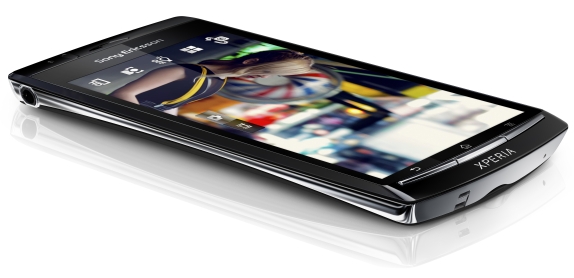
The Ultimate Avenger. Xperia Arc


Wassup TechiOtakus, here we bring a small yet precise post on "The" Sony Ericsson Arc. Hope you will like it..


Sony says "Your life in vivid colour. Videos and stills. Show it all off on the sharp, crisp and clear 4.2' multi-touch Reality display with Mobile BRAVIA® Engine. The Xperia™ arc Android touch phone - designed to be daring."
Buy Arc and u will get amazed by every feature of the phone.


Sony Ericsson XPERIA Arc at a glance:
  • General: GSM 850/900/1800/1900 MHz, UMTS 850/900/1900/2100 MHz, 7.2Mbps HSDPA, 5.76Mbps HSUPA
  • Form factor: Touchscreen bar phone
  • Dimensions: 125 x 63 x 8.7-10 mm, 117 g
  • Display: 4.2" 16M-color TFT capacitive touchscreen, 854 x 480 pixels
  • CPU: Qualcomm MSM8255 1 GHz Snapdragon platform
  • OS: Android 2.3 (Gingerbread)
  • Memory: 287MB storage, 512MB RAM, microSD card slot, 8GB card included in the retail box
  • Camera: 8 megapixel auto-focus camera with LED flash, face detection and touch focus; 720p video recording at 30fps
  • Connectivity: Wi-Fi b/g/n, Bluetooth 2.1 with A2DP, standard microUSB port, GPS receiver with A-GPS, 3.5mm audio jack, microHDMI port
  • Misc: Sony Ericsson Timescape UI, built-in accelerometer, proximity sensor, Sony Mobile Bravia engine, multi-touch input, scratch-resistant surface
Xperia Arc and Play launch in India on 7th April at a price of 32000 INR. Bollywood actress Chitrangada Singh shows Arc sexy phone shown by a sexy lady.... XD.


Here a short video demo of the XPERIA Arc user interface, courtesy gsmarena.


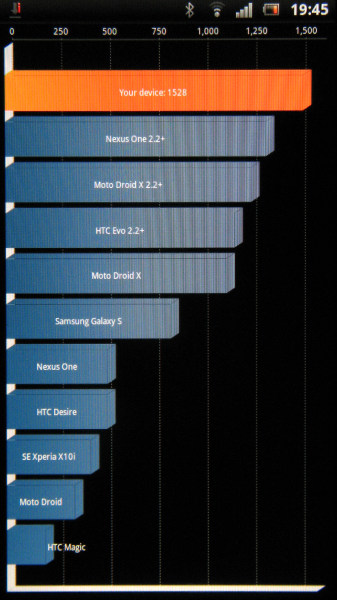
As far as general performance is concerned the Sony Ericsson XPERIA Arc does splendidly. It uses a Qualcomm MSM8255 Snapdragon System-on-a-chip featuring a 1 GHz Scorpion CPU and the Adreno 205 GPU. The Gingerbread optimizations help too.

XPERIA Arc is getting some excellent score on popular benchmarks.


Gaming is a great experience on Arc.. but one bad luck here ia it doesnt support plug ang play on a computer :(


The Arc has it all in terms of features: big quality screen, awesome 8 megapixel camera and HD 
camcorder, the latest Android. Not less important, the phone has a soul and spirit.
Post in comments your views,Share it if you loved it..