Showing posts with label Music Mania. Show all posts

Wednesday, June 15, 2011

Burn-Studio Audio Tool


Those who get bored mixing on virtual DJ or Tracktor,which i m sure would not get bored because they are so exclusive,to all others let us introduce the chrome app Burn-Studio Tool. it is a chrome browser app which allow users to mix music for free and upload them and share them.


The uberness of the app is its user interface which will blow your mind.
It is easy to use and doesnt takes a lot of time rendering the music,you can choose from a variety of music samplers and instruments to play along.Those acknowledged with Console DJs will find it very entertaining.
So install this app and enjoy..mixing music.

Click here to install this app and start mixing...

http://burn-studios.audiotool.com/app


For more help..see this video..


Thanks for your patience and reading this post..share it ..

Tuesday, May 10, 2011

NetRemote : Music for all


NetRemote Music allows users to view and control playback of their digital media wirelessly from their Pocket PC or Windows PC using Windows Media Player, iTunes, J. River Media Center or WinAmp. NetRemote runs on Pocket PC's and Windows PC's. NetRemote Music controls playback on multiple computers and multiple zones from any number of clients. With NetRemote, you can browse and play music by artist, genre, playlist, or album cover art from your Pocket PC or Windows computer.
Since NetRemote uses WiFi to communicate, there are no line of site issues common with most standard remote controls. As a result, NetRemote users can access and control their music from anywhere in their home. NetRemote is the only application available that provides this level of versatile control and playback for Windows PC's and Pocket PC's. NetRemote allows for custom interfaces so you can design your own look and feel or download any number of interfaces from the Promixis Web site.


Friday, April 29, 2011

Music Mania : Audacity

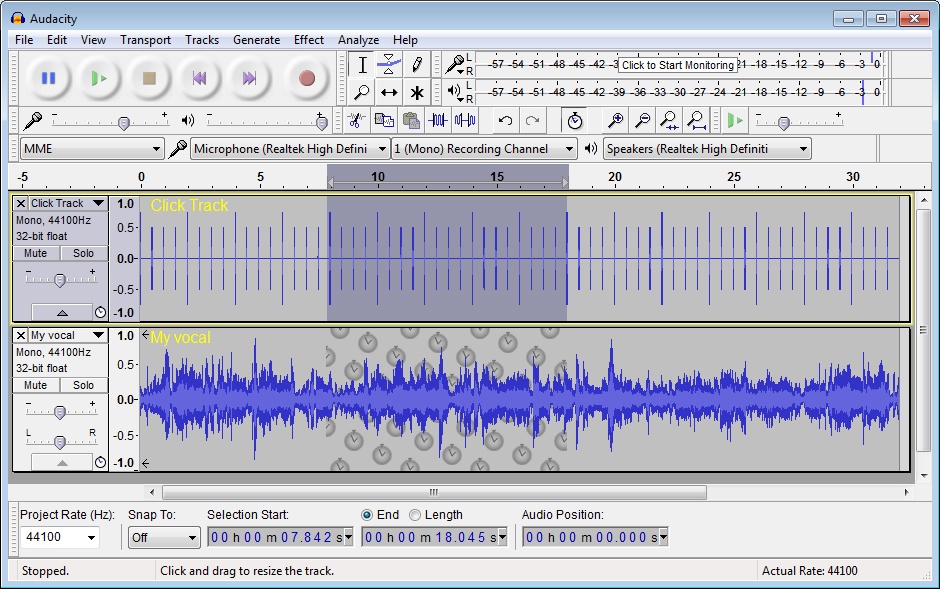
Hello TeciOtaku readers,we bring you another post on the hit series music mania.This time we are here with the well know audio mixing software audacity which claims to be best in mixing two audio files of different formats. Why we are bringing this in music mania series well let us tell you that this software is not only used by professional Djs but also by sound remixers as it is very light and comes under a GNU license

So let us peep into what it can provide,don’t forget to download it and watch the video to know how to use this while djing.


Audacity : The Insight

Audacity is a free, easy-to-use and multilingual audio editor and recorder for Windows, Mac OS X, GNU/Linux and other operating systems. You can use Audacity to:


  • Record live audio. 
  • Convert tapes and records into digital recordings or CDs. 
  • Edit Ogg Vorbis, MP3, WAV or AIFF sound files. 
  • Cut, copy, splice or mix sounds together. 
  • Change the speed or pitch of a recording.

Features

This is a list of features in Audacity, the free audio editor. For more information on how to use these features, go to the help pages.

Recording
Audacity can record live audio through a microphone or mixer, or digitize recordings from cassette tapes, vinyl records, or minidiscs. With some sound cards, it can also capture streaming audio.

Record from microphone, line input, or other sources.
Dub over existing tracks to create multi-track recordings.
Record up to 16 channels at once (requires multi-channel hardware).
Level meters can monitor volume levels before, during, and after recording.

Import and Export

Import sound files, edit them, and combine them with other files or new recordings. Export your recordings in several common file formats.

Import and export WAV, AIFF, AU, and Ogg Vorbis files.
Import MPEG audio (including MP2 and MP3 files) with libmad.
Export MP3s with the optional LAME encoder library.
Create WAV or AIFF files suitable for burning to CD.
Import and export all file formats supported by libsndfile.
Open raw (headerless) audio files using the “Import Raw” command.
Note: Audacity does not currently support WMA, AAC, or most other proprietary or restricted file formats.

Editing

Easy editing with Cut, Copy, Paste, and Delete.
Use unlimited Undo (and Redo) to go back any number of steps.
Very fast editing of large files.
Edit and mix an unlimited number of tracks.
Use the Drawing tool to alter individual sample points.
Fade the volume up or down smoothly with the Envelope tool.

Effects

Change the pitch without altering the tempo, or vice-versa.
Remove static, hiss, hum, or other constant background noises.
Alter frequencies with Equalization, FFT Filter, and Bass Boost effects.
Adjust volumes with Compressor, Amplify, and Normalize effects.
Other built-in effects include:
Echo
Phaser
Wahwah
Reverse

Sound Quality

Record and edit 16-bit, 24-bit, and 32-bit (floating point) samples.
Record at up to 96 kHz.
Sample rates and formats are converted using high-quality resampling and dithering.
Mix tracks with different sample rates or formats, and Audacity will convert them automatically in realtime.

Plug-Ins

Add new effects with LADSPA plug-ins.
Audacity includes some sample plug-ins by Steve Harris.
Load VST plug-ins for Windows and Mac, with the optional VST Enabler.
Write new effects with the built-in Nyquist programming language.

Analysis

Spectrogram mode for visualizing frequencies.
“Plot Spectrum” command for detailed frequency analysis.

Because of the inbuilt support of plugins and effects it is also use by DJs to premix a track..

Here's the video to make it more clear..


Now watch this vedio to understand how it is used by DJs to mix songs..this one is very cool.


Hope you liked it and now want to download Audacity,so
                                                      Download this
Visit the official website for more information and do comments to tell us what you mixed with audacity..don't forget to share it as well.

Music Mania : Ableton Live

Heya Techis and Otakus,we bring another post for the series on music mania for all the music loving buddies out there. So what we have got in today’s post is the super awesome software used by most of the music mixer,producers sound recordist and yeah The DJs. Hold your breath and read the ;ost till the end..oh you dont have to hold your breath just read.


Ableton Live


Ableton Live is tailored for simple, on-the-fly audio production, but provides classic audio workstation functions found in more expensive software. The Arrangement View shows a familiar timeline-based interface found in other digital audio workstations, while the Session View is perfect for improvising and sketching out all your musical ideations.


In either view, adding sound clips, full tracks and virtual instruments from Live's extensive audio Library is a simple task with the File Browser. Drag and drop audio files from the library, or anywhere on your computer, into the timeline. Once you have your composition together, changing the speed is a simple matter of using the warp tool to alter speed without warbling, stuttering, or other artifacts.
As it makes clear in its namesake, Ableton Live is built for live performance. The program and its interface are designed for on-the-go, real-time manipulation, modification, mixing and creation. For that reason, electronica artists the world over have been using the program successfully in their sets as a central instrument, using its sequencers, synthesizers, effects and combinators to make sounds and songs unlike any other.


While much of the performance is dependent on the computer specs, meeting and exceeding the recommended specifications will almost assure users of seamless, latency-free performance.
Ableton Live is used by artists the world over, for everything from quick digital notepad sketches to full, end to end audio production. With the added features and clean interface, you'll spend more time creating and experimenting in Ableton Live, and less time setting up and troubleshooting.


Ableton Live can also be used to mix songs before live performance,it provides unique features which can be used by amateur also .It is easy to learn and easier to mix.


Thanks to its unique real-time features, Live opens up entirely new worlds of creative expression. Mix any number of tracks and loops, remix on the fly , capture audio loops in real time from decks and other external sources, incorporate your own productions into the mix, and much more. Whether it's the center of your DJing rig or a creative addition to your existing setup, Live brings fresh possibilities to DJing.

Record perfectly cut loops on the fly, mix and match audio of any tempo, and add effects, all without ever stopping the music: Everything happens in real time. Follow your inspiration and use your time more creatively, instead of spending it converting sample rates, calculating tempos, editing loops and routing complicated effect chains. Live keeps the music flowing and gives you back your creative time.


Live is a musical sketch pad that quickly and easily lets you try out new ideas and capture those you like for later use. From Live Clips to Racks and its powerful browsing capabilities, Live encourages experimentation and makes sure that no good idea ever gets away.


Download it from here,give it a try and feel free to ask anything about it..


Thursday, April 28, 2011

Music Mania : Traktor Pro

Hello TechiOtakus…well this post is the continuum of the music mania series in which we tell you how to mix songs and all posts related to music and mixing. So in this post we will tell you about another song mixing softwares used by professional DJs to mix awesome tracks on their computer.


Traktor Pro


For everyone from the professional DJ to the music enthusiast, the abundance of great DJ software is out there waiting for you. The best we have found is TRAKTOR Duo 1.2. With its expansive special effects and features, easy-to-use interface, and complete compatibility with external equipment, TRAKTOR Duo stands head and shoulders above the competition.


TRAKTOR Duo 1.2 provides for the ultimate experience in DJ software making it our number one choice. Boasting a variety of fully modular and customizable interface settings, an impressive set of mastering and recording tools and some of the most accurate and easy-to-use loop and beat-matching tools available, TRAKTOR Duo makes a very convincing argument for itself. Best of all, it’s fully compatible with iTunes and most file formats, even allowing for the direct import of files from an iPod or other personal audio or data storage device.


Design Features: 


TRAKTOR Duo stands out for its ability to integrate advanced effects and options into a simple, user-friendly format. Much of the estimation and guesswork that goes into properly mixing tracks is eased with measured beat points displayed continuously in a dynamic beat visualizer. Loops and effects are synchronized to execute in coordination with timing of the track at play.


Providing for a simple and comprehensive importing and exporting, this DJ software easily uses and converts files of various formats, while sidestepping many of the time-consuming paths that most of its competition requires for reformatting and importing. Best of all, TRAKTOR is fully compatible and easily-integrated with iTunes and other personal audio devices. It even offers full integration with BEATPORT.com, where new tracks can be purchased and downloaded directly to TRAKTOR Duo.


With full support for multiple MIDI controllers, HIDs and advanced MIDI assignments for optional line-in control by CD, vinyl or MP3 decks and its capability to record mixed CD’s, broadcast directly to the internet, iPod, and an external MIDI keyboard, again, this program proves its right to be in first place.
TRAKTOR Duo also features automatic gain control, high quality, independent tempo and key correction, providing for seamless mixes between tracks that would otherwise require a great deal of manual adjusting. The loops and effects are automatically synchronized with the track at play to provide the ultimate performance. Its Elastique time-stretch feature has the ability to carry on with a high workload, displaying the quality of this product.


The interface is incredibly easy to use. With large easy-to-find buttons and real-time reactions, this site impressed us with its ease of use and smooth transitions. This program also boasts of awesome effects that assist the user in mixing and creating amazing electronic music. If you want to share your mixes with your fellow DJs, future employers, or just put your name out in the wide world of techno media, recording and publishing is painless with many options, including CD burning, iPod recording and internet broadcasting.


                                                                     Download This


Take a look at the Video Pick to get it more clear what Traktor Pro can Achieve


What..? Didn't get it ? Now take a look at the pro Djs mixing with Traktor Live.


Mix music like never before and please comment along with your playlist…dont forget to share it with friends and family.

Tuesday, April 26, 2011

Music Mania : Virtual DJ 7 Pro

TechiOtaku is starting this series of music mania which will help any buddy out there who wants to be a DJ or music mixer. Even newbies and amateur can give it a try on hand mixing music with the super cool software provided by us. This series is dedicated to music lovers and amateur DJs ,worry not friends we will make you  pro..just follow the series.
In the course of music mixing the first step is to have a good collection of music,songs and samples. So,before trying anything make sure you make  a playlist in which you can put your heart’s content..and then give this software a try.

Virtual DJ 7 Pro

Virtual DJ is often packaged with USB-based hardware mixing consoles from the likes of Hercules and Numark, and, in fact, if you really want to delve into the full array of features, such devices are going to be a necessity--and they'll require a $99 license fee to upgrade to the Pro version of the software. That said, you can download the app for free by itself and make very basic mixes and playlists.
While the program isn't specifically geared at newbies, it is intuitive enough for a musically inclined individual to use right off the bat. Once installed, Virtual DJ automatically populates a folder tree in the bottom left corner where you can easily access your music collection. The bottom middle serves as a tabbed, multifunction area where you can browse tracks, sample music bites, add effects, and make recordings.


Virtual DJ


The top of the window is dominated by two digital turntables, which are distinguished by color: blue on the left and red on the right. Each one has the ability to cue, loop, adjust pitch, scratch, and shift (among other features). In the middle is the mixing console, where you can adjust the gain and master volume, as well as transition between the two tracks. Once the songs have been dragged and dropped into the console, a bar along the top displays the sound waves of each to help with visual mixing. There's also a video input option that lets you create montages to the music.
It is stable, easy to use, insanely configurable, powerful and because of all of this, wildly popular. It is more immediate than Traktor for the beginner, it will work on just about any hardware, it has busy and helpful user forums, and has been consistently ahead of the pack in many areas, not least video mixing.


virtualdj


It also has built-in key detection, something none of the others has managed yet and arguably a must-have DJ tool nowadays.
The stylish interface and high number of features score points, but learning how to use the program is a hit-or-miss proposition. To be perfectly honest, using it without mixing hardware (that is, just a mouse and keyboard) is a challenge, and not one we enjoyed, so we recommend hooking up a compatible USB controller. Also worth a look: the thorough online user guide.
Virtual DJ is free, fully featured, and well-laid-out. It's a useful option both for aspiring mixers and newbies.


First download it from Here


Now we will teach You how to mix some songs and play them in front of friends or may be live Djing…

Virtual DJ – TechiOtaku DJing Tutorial


So,Virtual DJ is just aperfect tool for learning DJing for first time. Thus to start with you must download Virtual DJ first .

Step 1:


Create a playlist first,open virtual dj and point the folder option to the location of your songs. Drag Some songs,here we are going to mix five songs,So let us choose theme songs,you can create your own genre.
we will only mix Bollywood songs,as they are easier to mix for amateurs First we will choose Twist From the movie Love aajkal because it has a good tempo and cool beats,then we will add broken angel track mixed by mazzr,proceeding with peeloon (mash Up DJ remix ) and to add a hip hop track we will add char baj gaye hai(Mash Up Mix) the latest track,and at last we will play Tere Liye (Mixed by DJ ASen) with some filler as Atrium (River Flows in you Edit). You can eventually expand and produce awesome mixes.
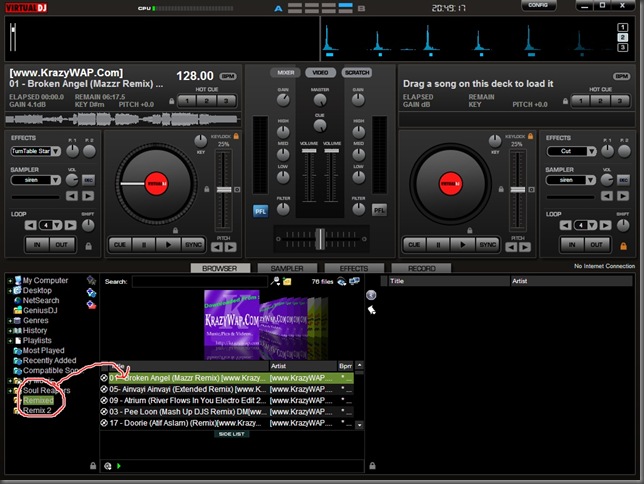


Adding Songs


Step 2 :


Then we will start with broken angel track and drag it to left deck,and add peeloon mix on the right deck,We will then click the play button on the left track also at the same time we will put the flanger effect ,which can be found in the effect tab,this will spice up the songs.You can also add various other effects,give it a try.
Playing one track


Step 3 :

Now after some time here at 2:30 minutes we will start peeloon track,now here Techiotaku is going to teach you how to beat matching,a trick which is basic for all DJ learners.
In beat matching while one song is playing other song is also played at the same time by adjusting the pitch ,Volume gain or tempo in such a way that it syncs with the other song. So here you can do that by looking at the BPM analyser at top and beat pattern,just start the next song when both the beats match each other.In virtual DJ Beat matching is very simple, Just press the sync button shown by red round below,while playing Peeloon track.
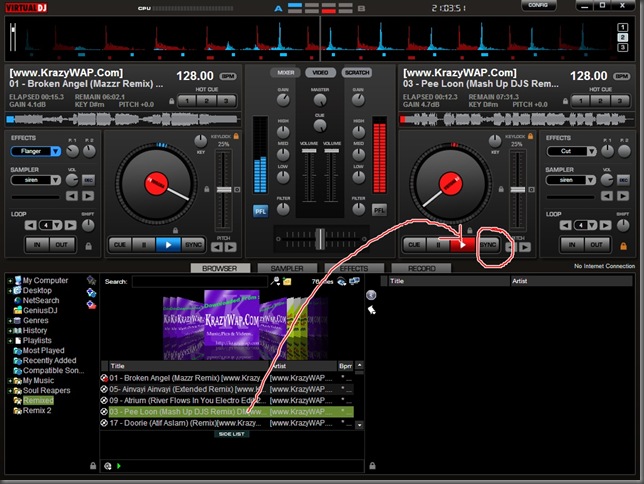


Beat Matching


Final Step :

Similarly play all the tracks one by one,while adjusting the gain and cross fader controls. You can also add samplers from each track,samplers are small part recording of a track,for example sample of a drum beat or siren.Remember to become a good DJ you need to practice a lot,and dont play tracks for more than 3 –4 minutes else the audience will get bored. Try adding a beat song after hip hoip and play love songs after trance or pop.


Finished Mixing  


Here is the video Pick to which will clear you more.


Hope it helped you to learn some DJing and please comment if you want to add more or have any suggestions regarding this,Do not forget to share it.