Showing posts with label Tips and Tricks. Show all posts

Sunday, May 08, 2011

CS 1.6 NON-STEAM || NO SURVEYS ,TOTALLY FREE ||

Tired of trying to find an actual/working Counter Strike 1.6 Hack even after months of tireless searching on the internet??


Search NO more !!

TechiOtaku is here, yet again to help you out.

The featured HACK PACKAGE includes ::

1.BaDBoy v5 (works for both STEAM and NON-STEAM , undetected by automated servers )

2.C.C.A._Hook_version 2.o for private (works flawlessly on NON-STEAM servers)


both the software packages and sXe injects include 

-Aimbot
-Speed
-Auto Wall
-Crosshair
-No Spread
-No Recoil
-Knife Speed
-Much more

download xanaduiN badboy hack.rar file from here or click the link below


1.1 To start the BADBOY cheat do this:


1) Open BaDBoYv5.exe
2) Press Load Hack button
3) Start Counter Strike and join a server
4) Press "end"-button to start cheat
5) Press "insert"-button to set up the cheat.
If you don't know how to move in the menu that comes up you scroll with your mouse-scroll to get down and up in the menu. To get in to a sub-menu, you press the left mouse button, and if you want to go back one step you press the right mouse button. As simple as that.
 6) Press start-it in the menu to activate the hack


2.1 For the C.C.A. hack do this

1. After the download extract RAR file open C.C.A HooK v2. 0 for PrivateC.C.A HooK 2.0 home folder.
2. There you will see CCA hack.exe open it asks your CS 1.6 path setting.
3. Set your path c: file counter strike 1.6hl.exe or what is always yours.
Your counter strike 1.6 game to start and press L connect new game on your system.when is the game with any server or start then your CS 1.6 hack began is started.


New feautures added in version 5.
- New AimBot that aims better.
- New consol with a picture as background.
- New menu-style
- New ESP textures
- Winamp player
- Panic Key (not working properly)
- A clock below the radar

To get the cheat-console up you press "delete"-button.
In here you can write many commands like:
- speed
- wall
- nospread
- avdraw
- and many more
With the commands you might have to add a number after witch will set the setting for you. You could change the wall for an example by writing: wall 2


Tuesday, May 03, 2011

Top 5 best CPU coolers-TechiOtaku chills all

Hi guys..for those techiotakus who are avid gamers,and want to buy CPU coolers ,well what we can say is just chill and read the whole post...

Top 5 CPU coolers


we searched the market ,and asked some best gamers about the CPU coolers they have installed on their PC,as a CPU haet sink is very important stuff for your cooling needs,high level games and rough usage makes the CPU as well as Graphic card to heat up alot so to prevent this you must have a good CPU cooler and these are the top 5 picks..

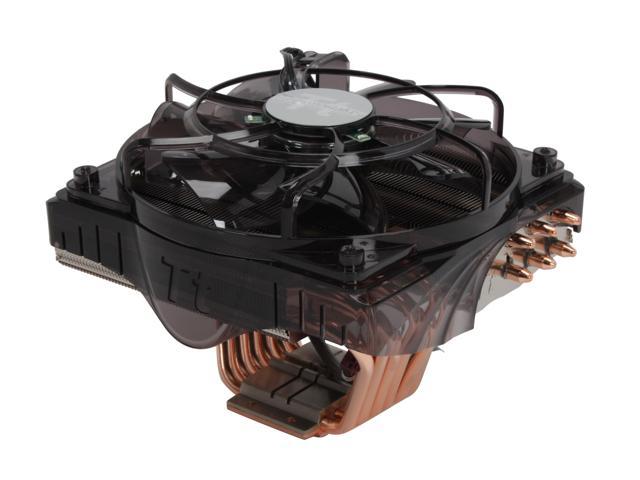
1.cooler Master v10


Tremble, heat; quiver, thermal design power; cower, mere mortal air coolers – you've all met your match in the Coolermaster V10.
This monster air cooler delivers a phenomenal specification and proportions.
Measuring 24cm long and 16cm high this is a beast, but for good reason – it's packing two 120mm fans, three heatsink arrays, ten heatpipes and there's even a hybrid "TEC" heat pump buried inside there as well. It also uses a solid copper cooling block and has a universal mounting bracket.


2.Thermaltake CL-P0456


Step up from your stock cooling fan and heatsink to the Thermaltake CL-P0456 CPU cooler. Supporting both Intel (LGA 775) and AMD (socket AM3/AM2/AM2+/939/754, supports AMD latest 6-core processors) platforms, it will take care of your high-end processors. It has twelve large exposed 6mm pure copper heatpipes at its copper base which directly contact the CPU for highly efficient thermal conduction, plus the whopping, completely silent 140mm fan with blue LED directs huge air flow to cool down the CPU as well as the surrounding. VR Fan function allows you to adjust the fan speed for your need. It doesn't matter how much heat your CPU generates, you'll have trouble preventing it from getting frosty.

3.ASUS Royal Knight


Pros: more than 3 months use. on athlon ii x2 250, everything is running cool and quiet. rated 1300rmp at max but also runs %50 at ~830rpm. the two speeds i do not notice any obvious sound/noise difference. Really is quiet, near-silent. my temps idle 23c / load ~30c(i think or i never do anything too intense). chilled copper to the touch (i dont recommend touching without grounding yourself beforehand). look awesome, make sure u have room in ur case, stands about 140mm tall, 120mm wide.

Cons: not for small form factor cases. micro atx cases should work, as i am using it on one too. but if your rams have tall heatsinks, on a matx boar, the copper heatsink on this may block it. i have no problem, as i use only two memory slots further from the heatsink. still you could use four rams, if they are of traditional dimm (or ddr,ddr2,ddr3, etc only height of ram's heatsink matter) stick's overall height.

Other Thoughts: %50 830rpm all day 24/7. never overheat. assured feeling that cpu is properly taken care of (tempurate-wise). it really is quiet, better than my case fans i think.


4.Cooler master v8


The Cooler Master V8 has been available now for several years, but it still proves to be a big seller for the company. Cooler Master are due to release new coolers over the coming months.

Manufacturer: Coolermaster
Model No.: V8 (RR-UV8-XBU1-GP)
Materials: Nickel plated aluminum fins, copper heatpipes, aluminum base.
Fan Mfg: Coolermaster A12025-20RB-4DP-F1
Fan Spec: 800-1800RPM, 12V, 0.32A
Fan Dimensions: 25x120x120mm
Heatsink & Fan Dimensions: 161x122x121mm
Weight: 865 grams
Includes: LGA775 and K8 socket mounting hardware, thermal compound, instructions

5.Thermaltake spin Q


Thermaltake SpinQ with various accolades particularly pertaining to its performance. But at the same time the SpinQ is a true piece of art. Never before had a single CPU cooler received so many highly regarded design awards as the Thermaltake SpinQ: Just recently another prestigious award underlined the outstanding concept of this CPU cooler when it received the Computex Taipei Design & Innovation Award 2009, now the SpinQ has received all 5 major global design awards: 

Features:
Support the latest Intel Core i7 CPU
Clip supports Intel Socket LGA1366 included
Stylish Appearance
Classic Cylinder Heatsink and Spiral Aluminum Fins
Optimized Structure
6 Copper Heatpipes
80mm Blow Fan
Low Noise Performance
VR™ Fan Control
Smart Airflow Design
Integrated with System Fan
360∘ Heat dissipation


Special Mention....


Noctula NH-U12P


The Noctua NH-U12P is a slightly refined take on the companies previously successful NH-U12 heatsink. This time around, Noctua bundle in the NF-P12 fan, and it's not your average 120mm vaneaxial fan either. It's flesh tone coloured plastic draws attention away from its three key innovations; SSO bearings, vortex-control notches, and textured leading impeller surfaces. That translates into a fan which is very quiet at a speed of 1300RPM, and with two in-line resistors its rotational speed can be further reduced without impacting temperatures much.

well that is the end of review,hope you buy one and add it to your rig..enjoy sharing and do comments..


Free Utility To Make Your USB Pen Drive Bootable

Hello techiotakus this post is for those avid windows users who are in a hurry and would like to boot up from USB..
If you are an fairly advanced computer user, at times you may need to boot from devices other then the default hard-disk, mainly to troubleshoot virus infections and other critical operating-system related issues, I had shared tips on how to make bootable cd for performing advance system tasks on windows. Today I will share few utilities enabling you to create bootable USB pen drives with ease, you need to have Motherboard/BIOS with USB boot support for this to work.
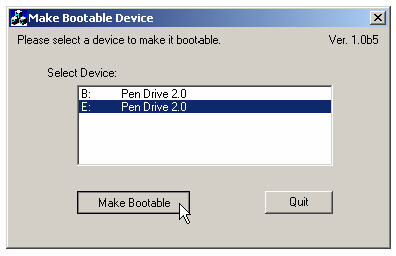
MakeBootable


MakeBootable is an free and simple-to-use utility to make your Pen Drive act as a boot-up disk without erasing any data on the device. It consists of a single executable file and requires no installation, However the utility will only work on USB device's using Phison’s chip solution and FAT file-system only (you can re-format your drives to FAT easily).
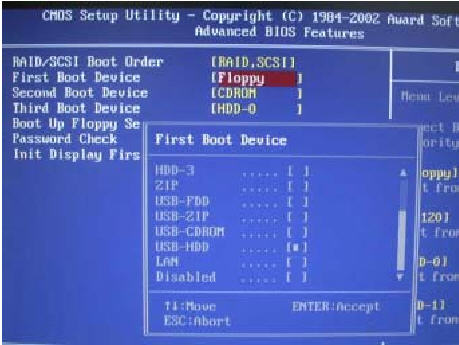
There are quite a few other manual methods to make usb devices bootable as discussed here, once you succeed in making your USB drive bootable using any of the method discussed above, You need to change the boot-up setting in the system BIOS as described below to boot using your portable device:

With your device inserted, restart the machine.
Enter the BIOS setup menu to change the boot device setting.
If the boot-up files are created in the USB drive, select USB-HDD or USB-ZIP (preferred). If the boot-up files are created in the floppy drive of your device, select USB-FDD (for Pen Drive that supports security mode).
Save and exit the BIOS setup. You should be able to boot up with you USB device...

click on the button to start downloading this utility..or click on the link below..


Or  click here ->                               Download This


Hope it makes you problem go way..do comments if you have any problem and share it...


Saturday, April 30, 2011

Key's Redefined


Hello techiOtakus, here we bring you another post... this post is about remapping your keys on the keyboard...


The other day i found some of my keys were not working.... so i searched the internet as my friend told there is a software that can change the key and i found KeyTweak.


KeyTweak lets you remap any key on your computer’s keyboard. KeyTweak makes modifications into your registry to remap your keys where you want them. It doesn’t launch specific programs with specific. It’s just re-map keys. for example you want type K when type P. so you remap P to Type K. Also able to re-map special keys F1-F12 .. Useful tool for Laptop Users.


Other very useful app is on-screen keyboard... it is a windows app and comes preloaded with windows..


Leave comment if you have any question about it usage..and share it.


Saturday Firefox Extension II


Hello guys we are back again with another Firefox add-on this week.in this series we tell you about one Firefox extension which makes your browsing experience better.
Read till end what we have got today for you and download this extension and install it..


Customize Google


Customize Google is a very robust extension that lets you customize many features of the services provided by Google. Customize Google lets you block advertisements on pretty much any Google page (including Gmail). It remaps Google Images search results to point directly at the images (no longer will you need to click through the originating site).


Customize Google lets you add links from other search engines directly into your search results. It can also block Google click tracking and allows you to connect to Google Calendar and Gmail securely (https). Give it a try, you won’t be sorry.
Click on anyone to watch a short introduction..


Hope you liked the introduction part..pour in comments to know more and suggest your favorite extensions.

                                  Click To Download 


Share it...as no world is better without sharing.

Friday, April 29, 2011

UX Theme Patcher -Turn Your XP into Mac

If you have been fiddling through to change the old boring look of your windows XP then you are at the right place..just read till end to find out how you can change your window Xp theme with no headache and without turning your PC to tortoise .

UXTheme Patcher 


Since Windows XP was released, there are countless 3rd-party visual styles released by many skinners in order to improve user's experiences and eye candy. To use non-certified visual style is disallowed by Microsoft's certificate protection so you need to bypass certification verification in uxtheme.dll.

This program will patch your theme engine files so you can use any 3rd party visual style on the following operating systems (non-beta releases only):
· Windows XP x86 Editions (up to Service Pack 3)
· Windows XP x64 Editions (up to Service Pack 2)
· Windows Server 2003 x86 and x64 Editions (up to Service Pack 2)
· Windows Vista x86 and x64 Editions (up to Service Pack 2)
· Windows Server 2008 x86 and x64 Editions (up to Service Pack 2)
· Windows 7 x86 and x64 Editions


However, please remember that you are advised to create a restore point before using this patch in order to make sure you don't lose any data or settings.


Download the Mac OS theme From Here only by TechiOtaku.


Visit This site for more Windows themes....


Watch this video for more details..


Download this and share it with others.


Take a look at the Naruto Wallpaper Collections in order to make your system look more better.

Tuesday, April 26, 2011

Music Mania : Virtual DJ 7 Pro

TechiOtaku is starting this series of music mania which will help any buddy out there who wants to be a DJ or music mixer. Even newbies and amateur can give it a try on hand mixing music with the super cool software provided by us. This series is dedicated to music lovers and amateur DJs ,worry not friends we will make you  pro..just follow the series.
In the course of music mixing the first step is to have a good collection of music,songs and samples. So,before trying anything make sure you make  a playlist in which you can put your heart’s content..and then give this software a try.

Virtual DJ 7 Pro

Virtual DJ is often packaged with USB-based hardware mixing consoles from the likes of Hercules and Numark, and, in fact, if you really want to delve into the full array of features, such devices are going to be a necessity--and they'll require a $99 license fee to upgrade to the Pro version of the software. That said, you can download the app for free by itself and make very basic mixes and playlists.
While the program isn't specifically geared at newbies, it is intuitive enough for a musically inclined individual to use right off the bat. Once installed, Virtual DJ automatically populates a folder tree in the bottom left corner where you can easily access your music collection. The bottom middle serves as a tabbed, multifunction area where you can browse tracks, sample music bites, add effects, and make recordings.


Virtual DJ


The top of the window is dominated by two digital turntables, which are distinguished by color: blue on the left and red on the right. Each one has the ability to cue, loop, adjust pitch, scratch, and shift (among other features). In the middle is the mixing console, where you can adjust the gain and master volume, as well as transition between the two tracks. Once the songs have been dragged and dropped into the console, a bar along the top displays the sound waves of each to help with visual mixing. There's also a video input option that lets you create montages to the music.
It is stable, easy to use, insanely configurable, powerful and because of all of this, wildly popular. It is more immediate than Traktor for the beginner, it will work on just about any hardware, it has busy and helpful user forums, and has been consistently ahead of the pack in many areas, not least video mixing.


virtualdj


It also has built-in key detection, something none of the others has managed yet and arguably a must-have DJ tool nowadays.
The stylish interface and high number of features score points, but learning how to use the program is a hit-or-miss proposition. To be perfectly honest, using it without mixing hardware (that is, just a mouse and keyboard) is a challenge, and not one we enjoyed, so we recommend hooking up a compatible USB controller. Also worth a look: the thorough online user guide.
Virtual DJ is free, fully featured, and well-laid-out. It's a useful option both for aspiring mixers and newbies.


First download it from Here


Now we will teach You how to mix some songs and play them in front of friends or may be live Djing…

Virtual DJ – TechiOtaku DJing Tutorial


So,Virtual DJ is just aperfect tool for learning DJing for first time. Thus to start with you must download Virtual DJ first .

Step 1:


Create a playlist first,open virtual dj and point the folder option to the location of your songs. Drag Some songs,here we are going to mix five songs,So let us choose theme songs,you can create your own genre.
we will only mix Bollywood songs,as they are easier to mix for amateurs First we will choose Twist From the movie Love aajkal because it has a good tempo and cool beats,then we will add broken angel track mixed by mazzr,proceeding with peeloon (mash Up DJ remix ) and to add a hip hop track we will add char baj gaye hai(Mash Up Mix) the latest track,and at last we will play Tere Liye (Mixed by DJ ASen) with some filler as Atrium (River Flows in you Edit). You can eventually expand and produce awesome mixes.
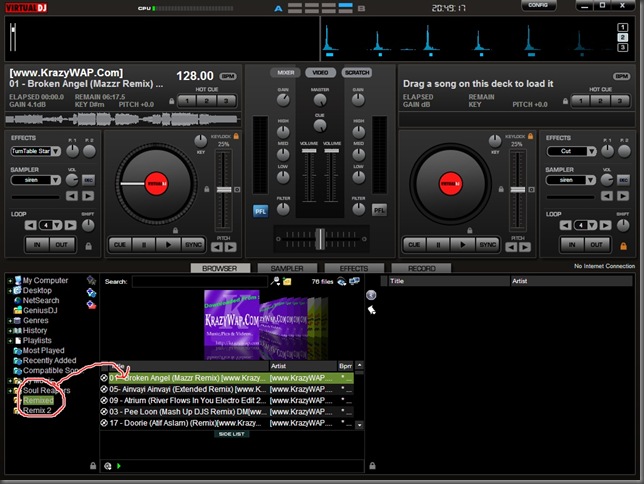


Adding Songs


Step 2 :


Then we will start with broken angel track and drag it to left deck,and add peeloon mix on the right deck,We will then click the play button on the left track also at the same time we will put the flanger effect ,which can be found in the effect tab,this will spice up the songs.You can also add various other effects,give it a try.
Playing one track


Step 3 :

Now after some time here at 2:30 minutes we will start peeloon track,now here Techiotaku is going to teach you how to beat matching,a trick which is basic for all DJ learners.
In beat matching while one song is playing other song is also played at the same time by adjusting the pitch ,Volume gain or tempo in such a way that it syncs with the other song. So here you can do that by looking at the BPM analyser at top and beat pattern,just start the next song when both the beats match each other.In virtual DJ Beat matching is very simple, Just press the sync button shown by red round below,while playing Peeloon track.
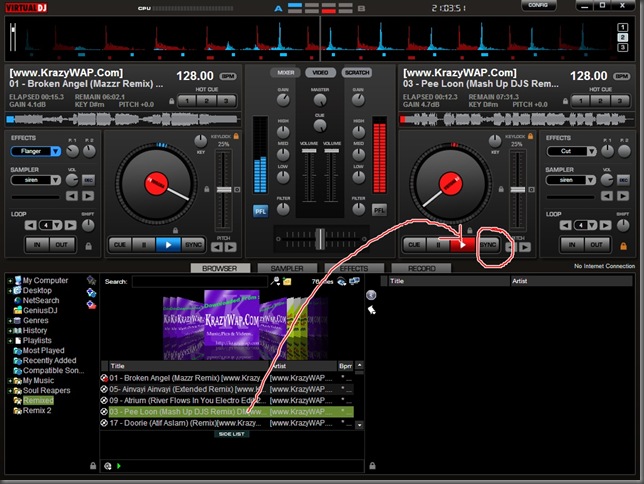


Beat Matching


Final Step :

Similarly play all the tracks one by one,while adjusting the gain and cross fader controls. You can also add samplers from each track,samplers are small part recording of a track,for example sample of a drum beat or siren.Remember to become a good DJ you need to practice a lot,and dont play tracks for more than 3 –4 minutes else the audience will get bored. Try adding a beat song after hip hoip and play love songs after trance or pop.


Finished Mixing  


Here is the video Pick to which will clear you more.


Hope it helped you to learn some DJing and please comment if you want to add more or have any suggestions regarding this,Do not forget to share it.

Chrome - A Calculator too


You all will agree with us tht chrome is best in terms of net browsings...but here another thing about chrome which is really awesome.
Chrome`s address bar is not just a simple address bar,but also acts as a calculator .Type any mathematics expression in the address bar and Google will give you answer